ComplianceCow Continuous Controls Management User Manual
Setup and Run an assessment
- Please install the GRC: Policy and Compliance Management.
- Set the system property:
1. Operate an Assessment
1.1 Log in to your dedicated ComplianceCow Instance.1.2 Navigate to the Manage User Credentials page at <ComplianceCow Instance URL>/ui/manage-user-credentials and generate new credentials. Keep this information secure, as it will be used by ServiceNow to authenticate itself to ComplianceCow2. Setup Users
Setting up non-admin users to access ComplianceCowTwo roles are available in ComplianceCow.- x_ntni_complicow.admin
- x_ntni_complicow.ccuser
3. Set up the application in ServiceNow
This is a one-time setup. Role required - admin.3.1 Navigate to All -> ComplianceCow -> ComplianceCow Setup3.2 In the Setup Screen, enter the ComplianceCow Instance URL and the client id and secret generated in the step 1.2 and click on ‘Save Configuration’3.3 On saving the details, the user will be taken to the ‘Setup and Manage Assessment’ screen4. Adding Connection Details to ComplianceCow
4.1 Navigate to All > System OAuth > Application Registry page.4.2 Copy the client id and secret from the oauth registry record - ComplianceCow Client4.3 Login to your ComplianceCow instance portal.4.4 Navigate to the Evidence tab in the domain preference page at <ComplianceCow Instance URL>/ui/preferences and update the client id and secret copied from the step 4.25. Setting up the ComplianceCow Assessments in ServiceNow
Role required - admin or x_ntni_complicow.admin or x_ntni_complicow.ccuser5.1 In the ‘Assessment Listing’ Page, click ‘New’ to add an assessment. You will be taken to the Assessment Form page5.2 In the Assessment page,5.2.1 Add the Assessment Name and any tags (if required)
5.2.2 Schedule the assessment run time in the Schedule Assessment Tab as shown below.
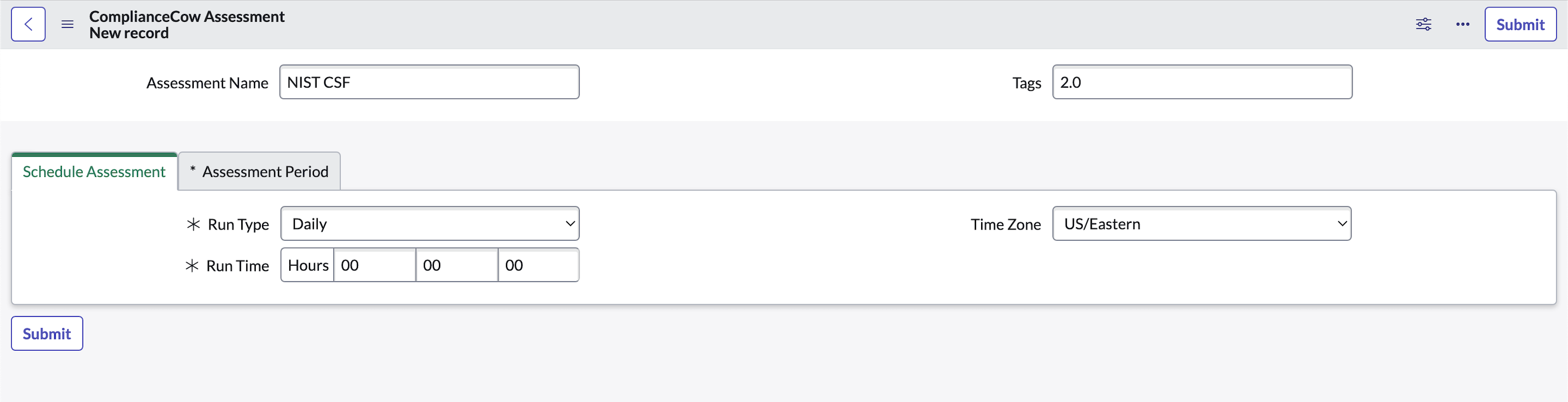
5.3 In the Assessment period tab, configure the time frame during which controls, risks, or compliance requirements need to be evaluated for compliance.
5.4 Click on Submit to successfully create an assessment.
6. Setting up the Control Objectives for the Assessments
Role required – admin or x_ntni_complicow.admin or x_ntni_complicow.ccuser6.1 Once the assessment is added, a related tab – Control Objective would appear at the bottom of the form. Click on the New button in this tab to open the Control Mapping-ComplianceCowAssessment screen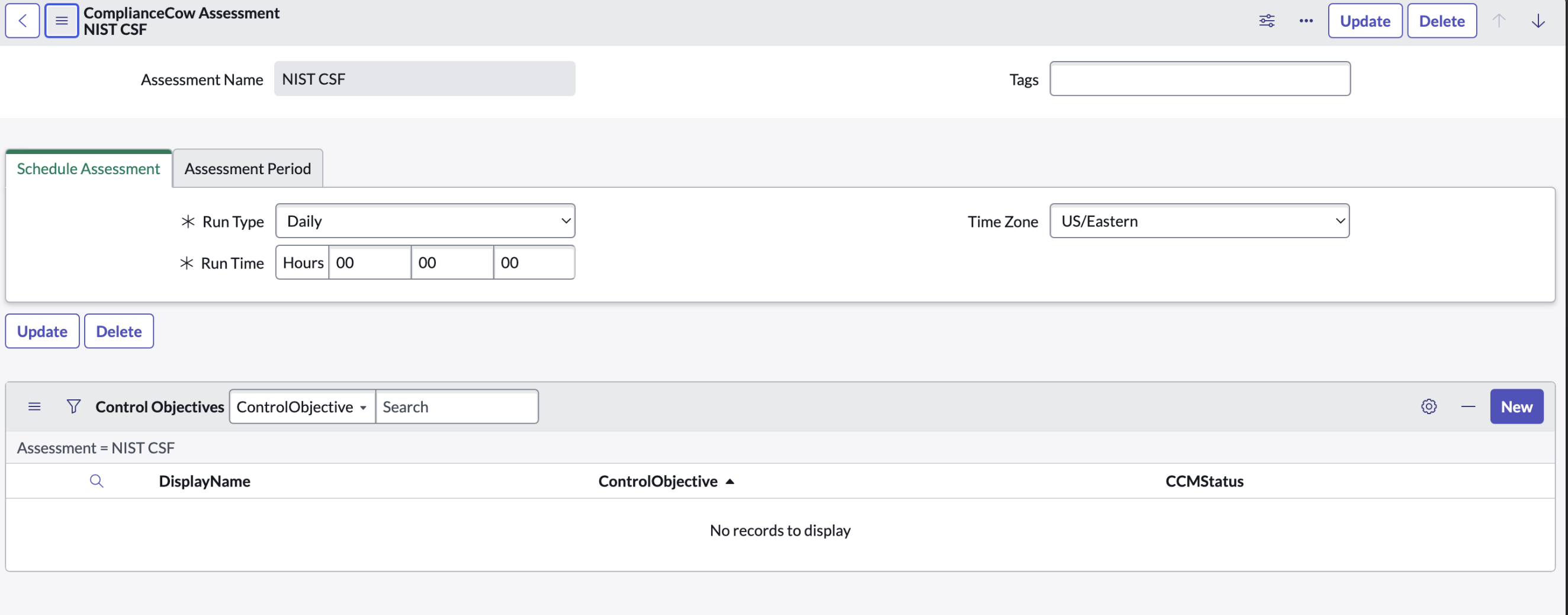 6.2 In this screen, select a control objective to add to the assessment.
 6.3 Click on the submit button to add the control objective to the assessment. Several control objectives can be added to the assessment.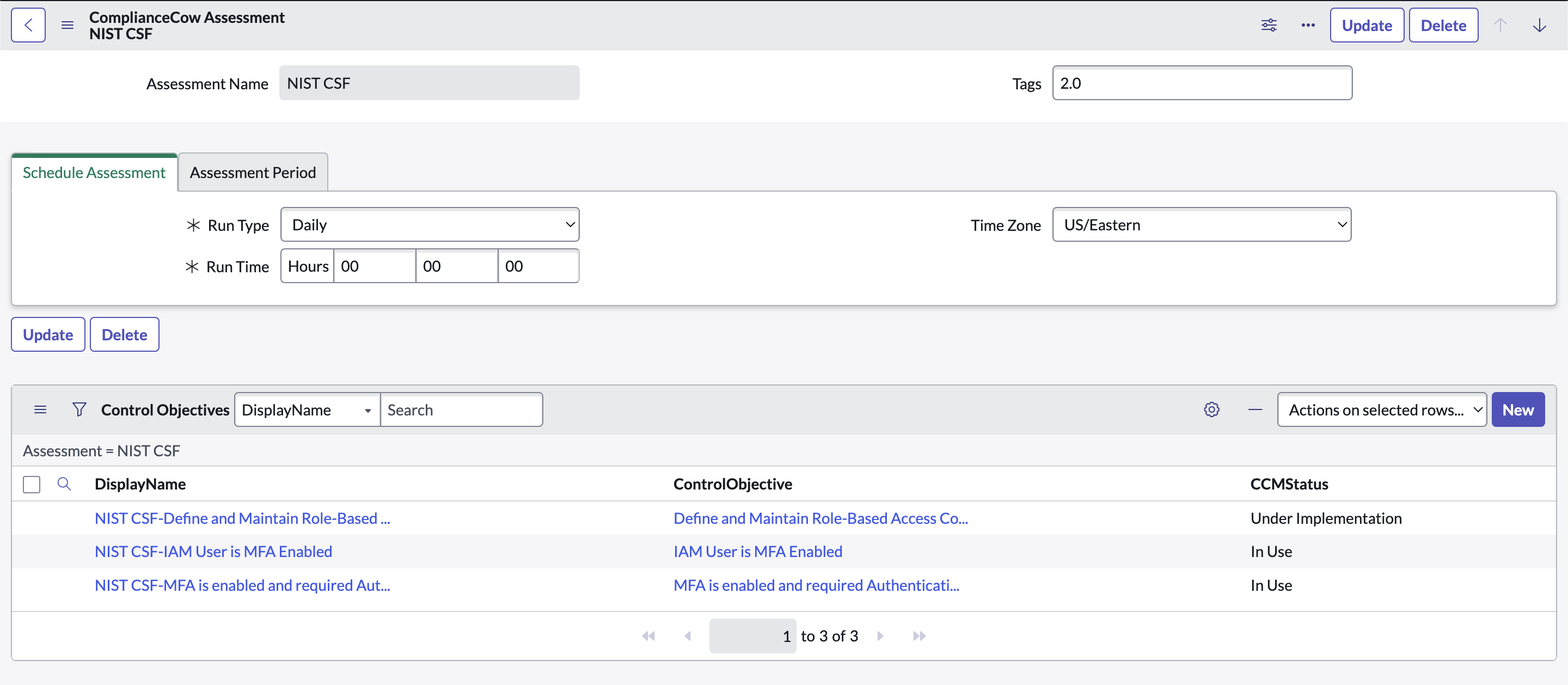
7. Activating the assessment
The control objectives are set up in the ComplianceCow Instance. A dedicated Instance is set up to perform these assessments by ComplianceCow. When the control objectives are ready for the assessment, an API call from ComplianceCow is sent to ServiceNow to activate the CCM Status. The CCM Status is changed to In-UseWhen at least one of the control objectives in the assessment is active, the assessment’s status changes to Active.Note: The assessment’s status can be viewed only by users having the System administrator and CC Admin Role.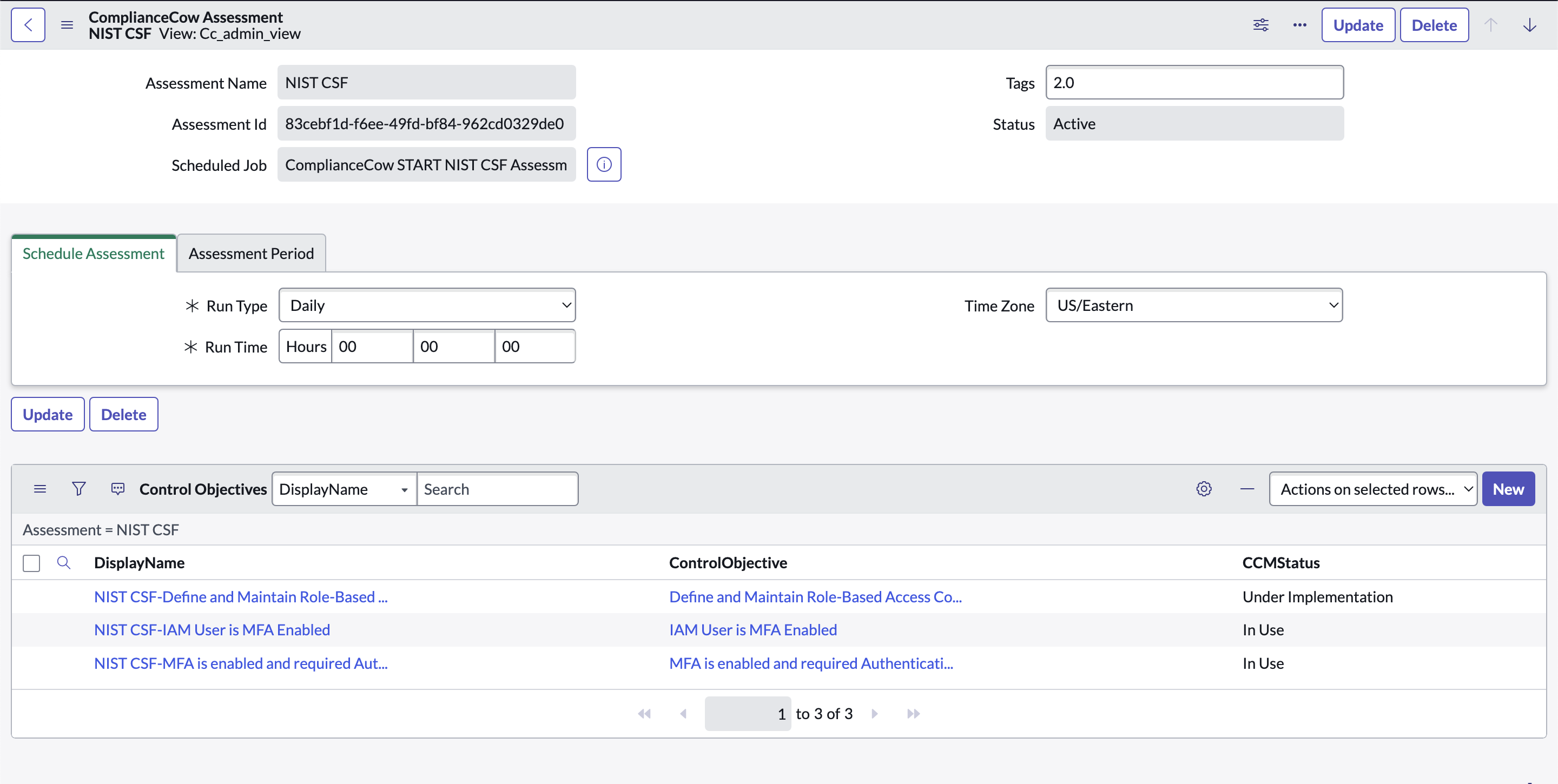
8. Monitoring controls
After the GRC indicator nightly scheduled job is run, compliance status is pronounced for the controls. To check the compliance status, click on the control objective in the Control objective Column.8.1 Navigate to the control objective -> controls tab and check the compliance status.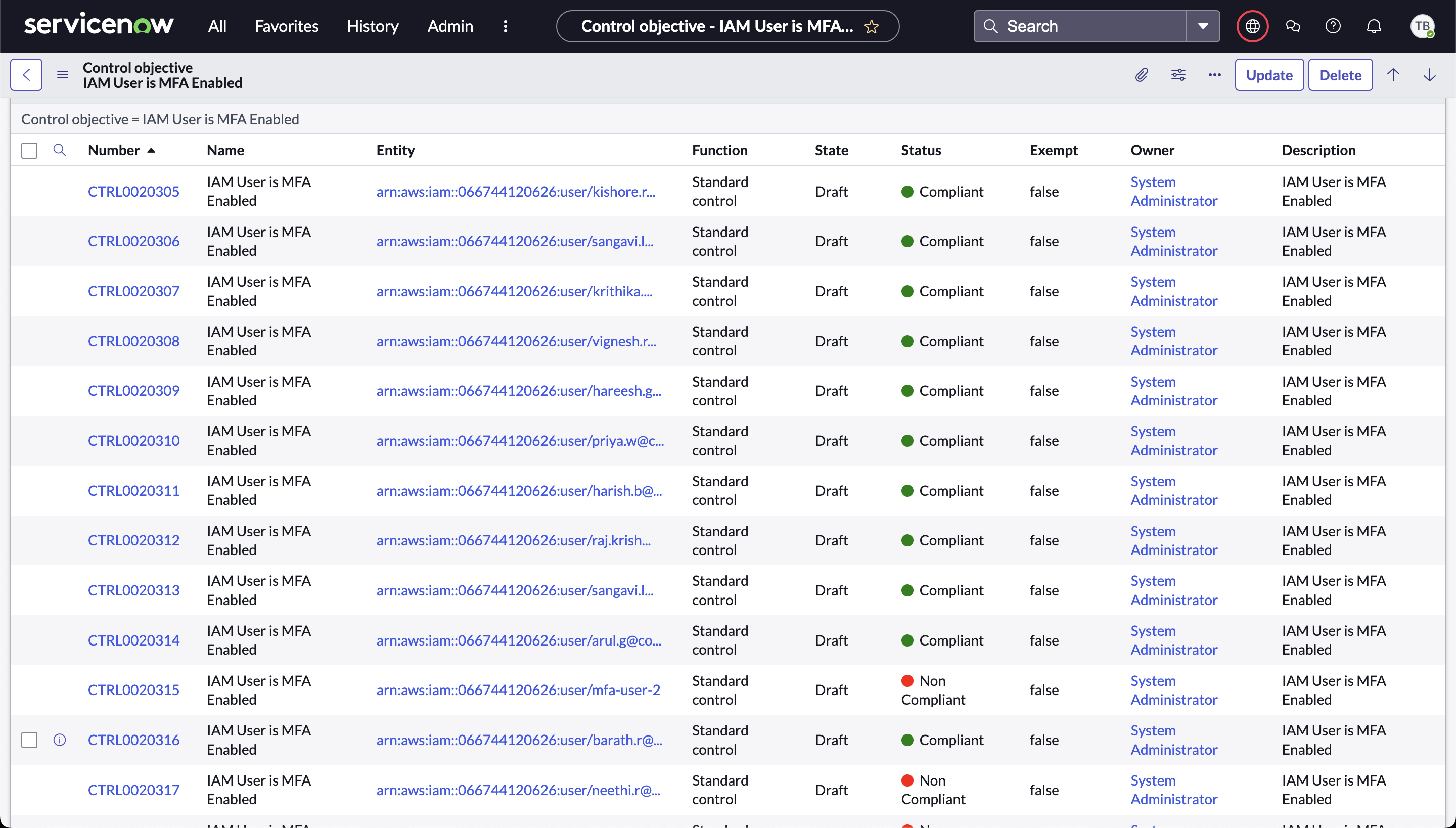 8.2 Navigate to the Control -> Indicator -> Indicator Results.
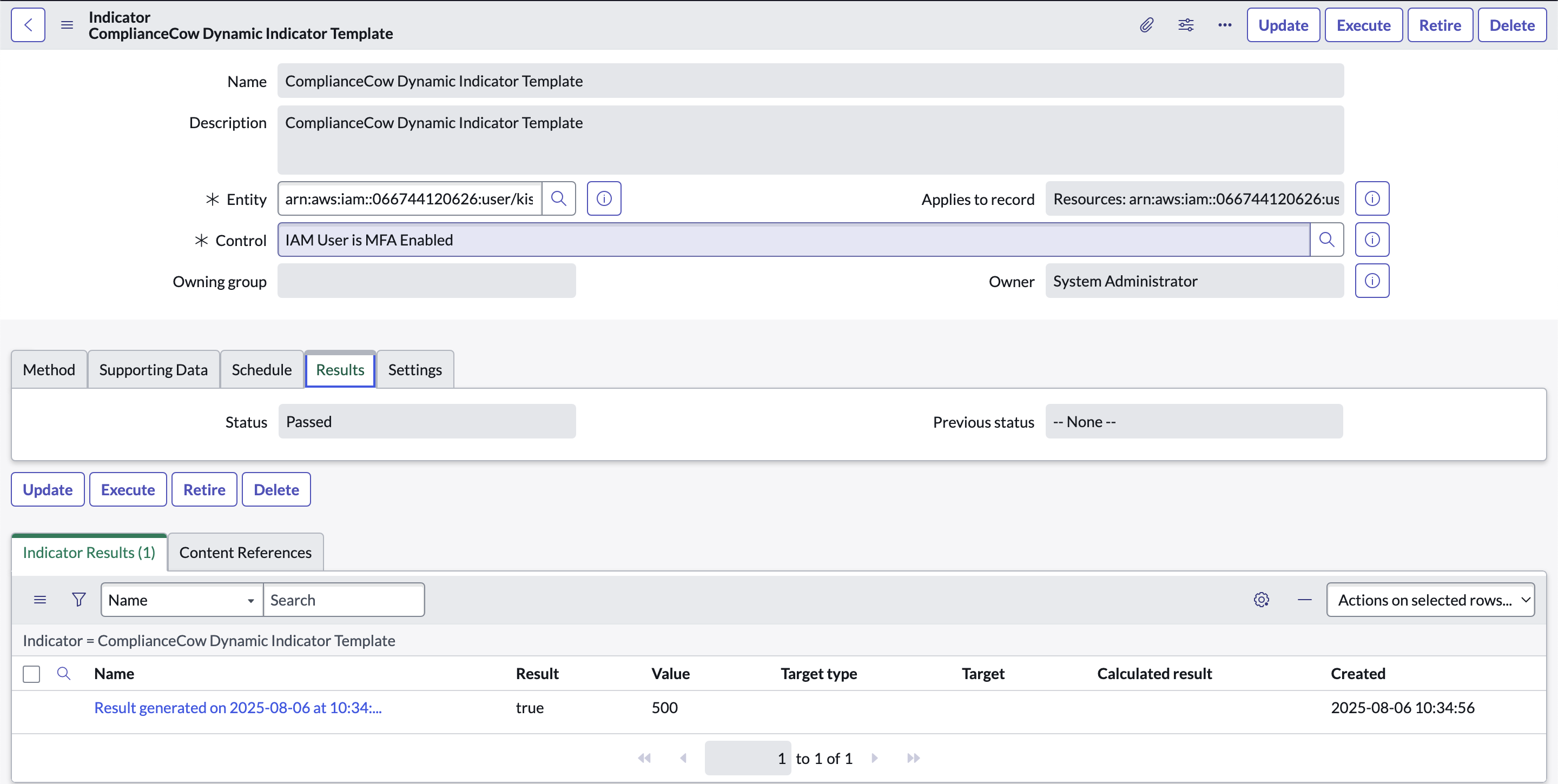 8.3 Click on the indicator result to check the compliance details.
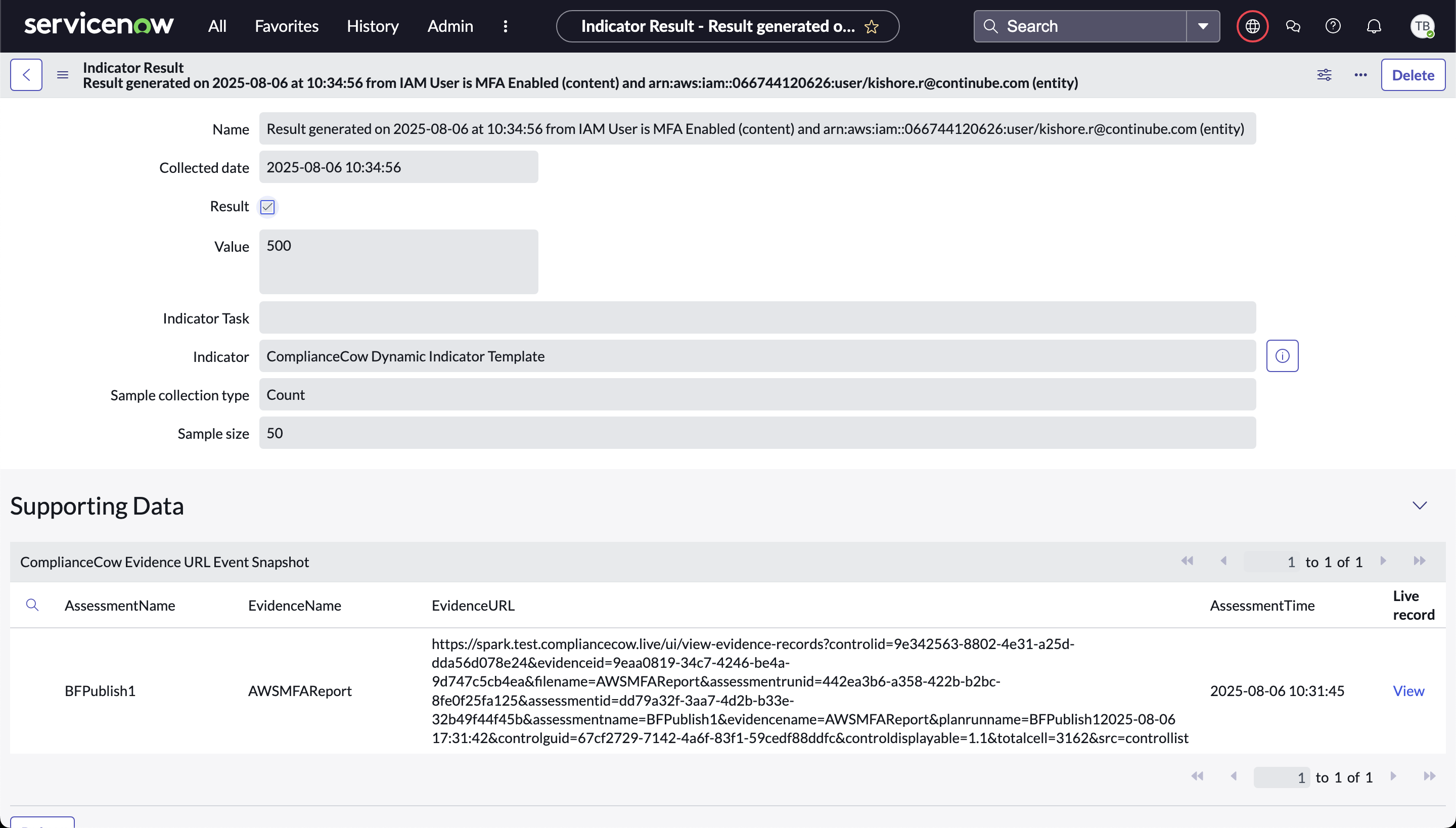 8.4 Click on View to navigate to the Evidence URL form page.
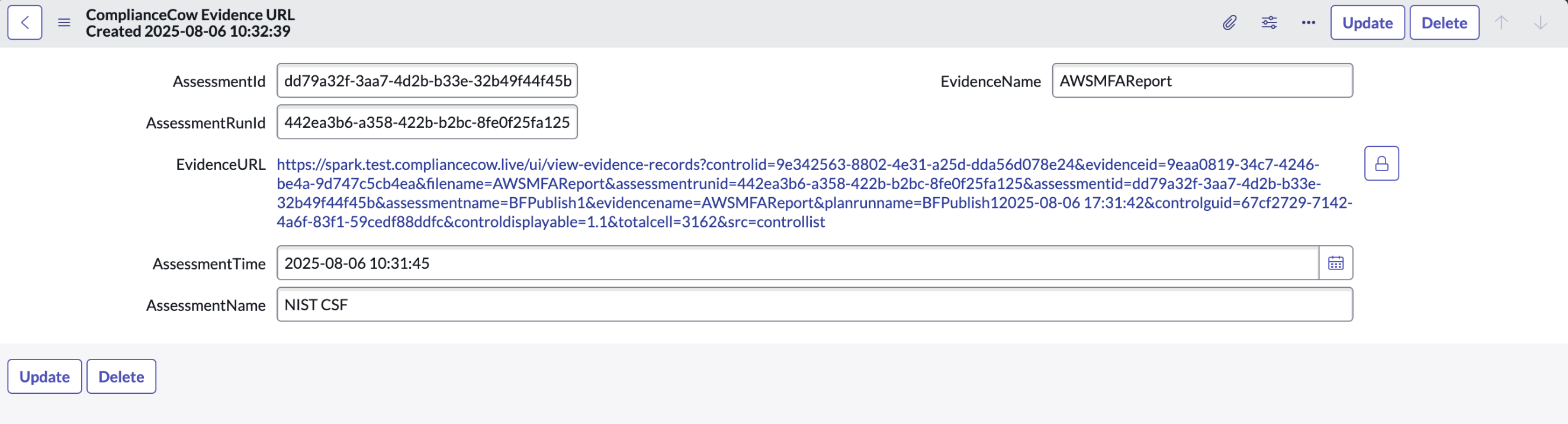 8.5 Clicking on the Evidence URL takes the user to the ComplianceCow Instance. Here additional details regarding the assessment result can be obtained.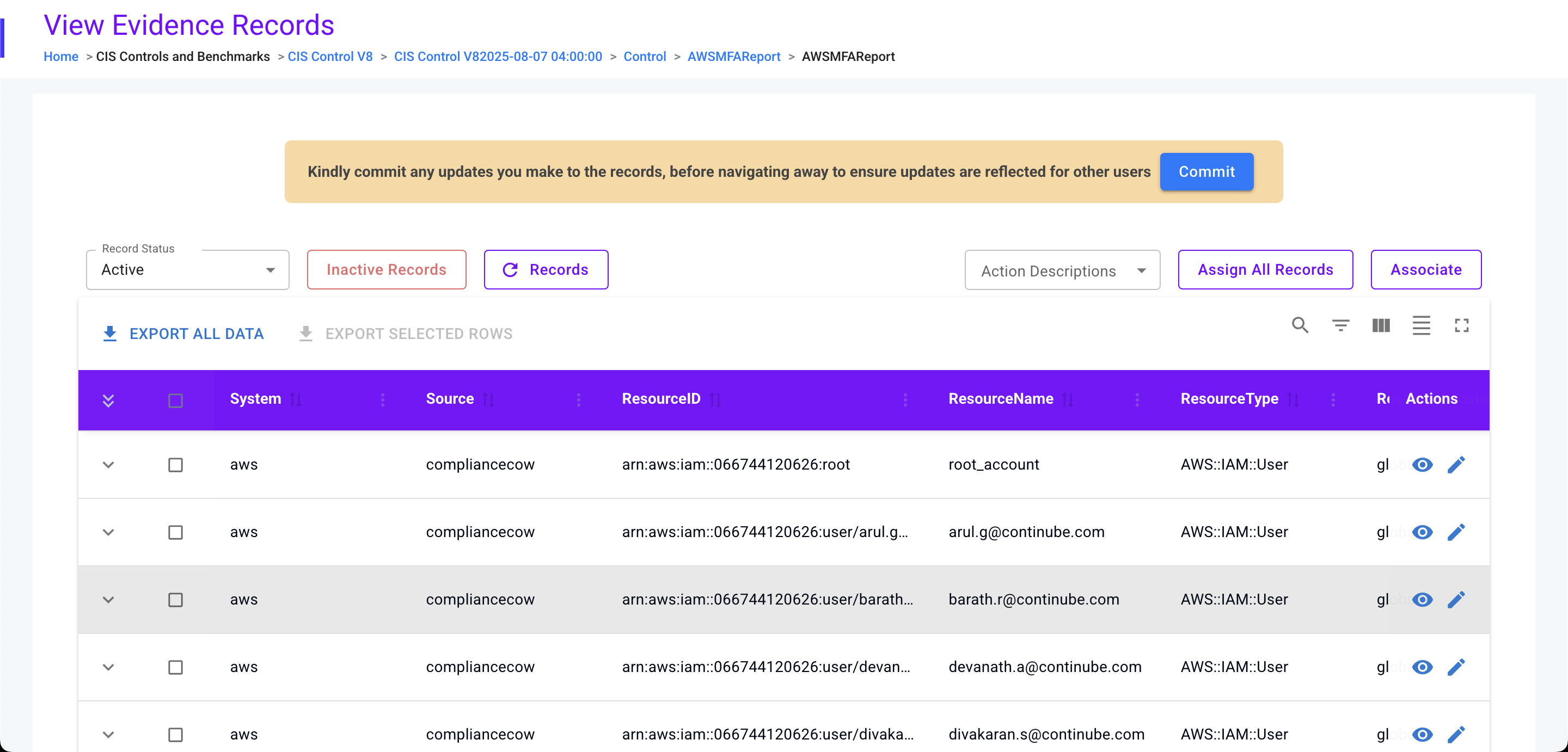
9. Deleting a control objective
Role required – admin or x_ntni_complicow.admin or x_ntni_complicow.ccuser9.1 Click on the Display Value column. The control objective page opens.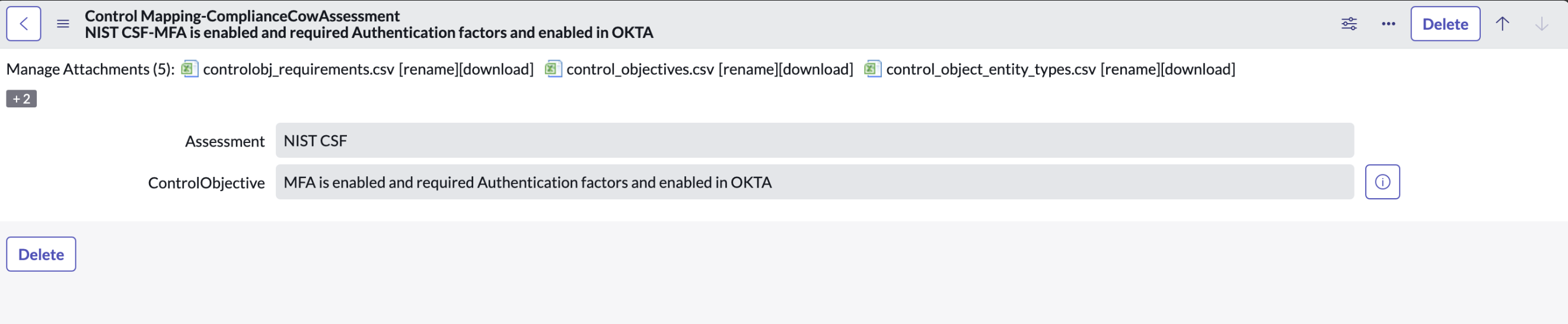 9.2 Click on the ‘Delete’ button to delete the control objective.
10. Deleting the assessment
Role required – admin or x_ntni_complicow.adminCondition – The assessment should not be associated with any control objectives. If the assessment was associated with any control objective, please delete the control objective before deleting the assessment.10.1 Click on the Delete button in the assessment form to delete the assessmentFAQ
- What are the roles that I need to use the ComplianceCow Continuous Controls Management application?
You would need one of the following roles.
- System administrator
- x_ntni_complicow.admin
- x_ntni_complicow.ccuser
- Who can install the application?
Only System administrators can install the application.
- Our ComplianceCow Instance credentials have expired. How do we update the credentials?
You can update the credentials through the ‘Update Setup’ Page. This feature is available only to the System administrator.
Navigate to All -> ComplianceCow Continuous Controls Management -> ComplianceCow Update Setup.
- We have migrated the ComplianceCow Instance to a different server. How do we update the new instance URL?
You can update the new instance URL through the ‘Update Setup’ Page. This feature is available only to the System administrator.
Navigate to All -> ComplianceCow Continuous Controls Management --> ComplianceCow Update Setup.
- Why am I not able to see all the fields in the Assessment form?
You can see all the fields in the assessment form if you are logged in as the System administrator or with the x_ntni_complicow.admin role.
- What is CCM Status? What does each status mean?
CCM Status is Continuous Controls Monitoring.
The following table describes what each status means.
S.No CCMStatus Description Is the control objective ready for Continuous Controls Monitoring? 1 Under Implementation The control objective indicator logic is under implementation. No 2 In Use The control objective indicator logic has been implemented. Yes 3 Not Implemented The control objective could not be implemented. No - How is the indicator logic for the control objective implemented?
Once the control objective is associated with an assessment, the details are sent to ComplianceCow. Once the logic is implemented in ComplianceCow, the status of the control objective changes from ‘Under Implementation’ to ‘InUse’. This change is automated by internal API calls.
- How is the indicator logic for the control objective implemented?
Yes, ComplianceCow can implement the control objective’s indicator logic and meet all the control requirements.
- Are there any criteria that a control objective has to meet to be associated with an assessment?
- The control objective’s category attribute cannot be empty.
- The control objective has to be associated with at the least one entity type.
- Are there any criteria the Entities has to meet for continuous controls monitoring in ComplianceCow?
- At present, the application does not support continuous controls monitoring for manually created entities. Entities should be generated dynamically from Entity Types using Entity filters from an existing ServiceNow table
- The Entity name should contain the unique id of the resource that it represents. For ex: An entity name of AWS resources can be the Resource ARN. This can be achieved by setting the field containing the ARN in the underlying CMDB or other resource tables configured for the Entity Filter as the display value for the table.

- When does Continuous Controls Monitoring (CCM) of a control objective begin?
Continuous Controls Monitoring begins when the assessment status becomes Active.
The assessment status becomes Active when at least one of the control objectives has a CCM status of In Use.
- When can an assessment be deleted?
n assessment can be deleted when it is no longer associated with a control objective.
- Who can delete an assessment?
System administrator or a user with the role: x_ntni_complicow.admin can delete an assessment
- Why has the indicator run not produced any Indicator results?
The reason why an indicator result is not produced could be one of the following:
- The control attached to the indicator is generated for a control objective that is currently not attached to any assessment in the table ComplianceCow Assessment(x_ntni_complicow_assessment).
- The control attached to the indicator is generated for a control objective whose state is either ‘Under Implementation’ or ‘Not Implemented’ and not in ‘In Use’ as explained in FAQ question 6.
- The state property of the control is not among the states configured in the System Property ‘x_ntni_complicow.cc_control_montoring_states’.
- There are no compliance results generated for the entity in the ComplianceCow assessment. To verify this, check if a record exists in the ComplianceCow custom table: ComplianceCow Evidence Data (x_ntni_complicow_cc_evidence_data) for the latest assessment run and evidencefilename. You can get the evidence file name attached to the control object from the table: ComplianceCow SNControlMapping(x_ntni_complicow_ccsncontrolmapping)